
VCF SD-WAN Insight: Overview
Version: 2026.1.1.0
This page is the technical reference for VCF SD-WAN Insight. Everything described here appears in Aria Operations once an adapter instance has been configured and a collection has completed. Two vendors are supported: Cisco Catalyst SD-WAN and Fortinet SD-WAN. The object model is shared across vendors and carries no vendor names; where a field exists for one vendor only, or is empty for another, the tables say so. The complete attribute list per object kind lives in the Metrics Reference; this page describes behaviour, content and topology.
| Cisco Catalyst SD-WAN | Fortinet SD-WAN | |
|---|---|---|
| SD-WAN Device | vManage / vSmart / vBond | FortiManager |
| SD-WAN Node | vEdge / cEdge edge router | FortiGate |
| SD-WAN Link | TLOC / transport interface | SD-WAN member / WAN interface |
| SD-WAN Location | derived from site-id / site-name | not created - the inventory has no site identifier |
| API | vManage REST (/dataservice/...) | FortiManager JSON-RPC (POST /jsonrpc), FortiGate data via exec /sys/proxy/json |
endpoint | Cisco Catalyst SD-WAN | Fortinet SD-WAN |
Dashboards
All dashboards live in a single folder, VCF SD-WAN Insight. Every widget is vendor neutral: it references only object kinds and metrics emitted by both collection paths, so the same dashboard renders Cisco Catalyst SD-WAN and Fortinet SD-WAN objects side by side. At large scale (hundreds of links, dozens of nodes) the entry point is a list, a scoreboard or a heat map scoped to one grouping axis, never an unbounded aggregation of the whole estate.
Five dashboards are shipped, generated by hack/gen_dashboards.py. Every inner name starts with VCF followed by a space.
VCF SD-WAN Health - the whole-pack status check:
- SD-WAN Device Status - a scoreboard of the device resource metrics: CPU usage, disk usage and memory usage.
- SD-WAN Nodes - Color: Health (%) | Size: Availability - heat map whose colour is the Aria health badge on 0..100 and whose size is the binary availability flag.
- SD-WAN Links - Color: Health (%) | Size: Availability - the same two axes over the WAN Links.
- SD-WAN Object Relationship - the relationship view, driven by the heat maps above, so clicking a node or a link cell drills the tree into that object.
VCF SD-WAN Node State - one site's routers at a glance:
- SD-WAN Nodes - Color: Availability | Size: Uptime - the nodes grouped by their SD-WAN Device; a 0..1 availability scale, red at 0 (down), yellow at 0.5, green at 1 (up), sized by
system|uptime. - SD-WAN Nodes - Color: CPU Usage (%) | Size: Memory Usage (%) - green at 0 %, yellow at 50 %, red at 100 % and above.
- SD-WAN Object Relationship - the relationship view, driven by both heat maps.
Both heat maps carry relationshipMode [1, -1, 0] at depth 10 and both drive the relationship view. Only the SDWANNode kind is declared as the heat-map bubble, grouped by its SDWANDevice: SD-WAN Locations and WAN Links appear in the relationship view, never as bubbles, because a link count per node would overwhelm the widget.
VCF SD-WAN Location - the per-site view on a Cisco deployment that carries sites:
- SD-WAN Locations Availability - a scoreboard of
inventory|node_availability_pct, the average availability of the reporting edge routers of each site. - SD-WAN Nodes - the node list with availability, CPU, memory, disk, BFD sessions up (Cisco), temperature and reboot count (Cisco).
- SD-WAN Links - the link list with circuit description, ping, jitter, packet loss, throughput and flaps.
VCF SD-WAN Insight Alert List - the alert triage view:
- Active SD-WAN Alerts - active alerts (status 0).
- Historical SD-WAN Alerts - resolved alerts (status 2).
- SD-WAN Object Relationship - both lists wire the selected alert into the relationship view.
The alert lists are filtered by adapter kind and by alert status only - [0] for active, [2] for resolved - with no resource-kind filter, so any alert the pack raises appears regardless of the object it is attached to. In practice that means the three kinds that carry alert definitions: SDWANDevice, SDWANNode and SDWANLink. A Location raises no alert of its own, because the availability of a site is already expressed by the nodes behind it. This file is pinned by a sha256 test and must not change.
VCF SD-WAN Insight - the standard self-service view of the adapter itself, present on every Indevops Management Pack:
- Object List - every object produced by the adapter, per kind, with its health badge.
- Adapter Performance - the adapter-level collection metrics.
- Metric Picker and Metric Chart - free exploration of any metric of any collected object.
Reports
The reports deliver the availability and transport quality figures used as service level evidence for the WAN service. Both vendors are included in the same reports, since they share the object kinds and metrics.
Sixteen reports are generated by hack/gen_reports.py into the single content/reports/content.xml: four object kinds (Device, Node, Link, Location) x four windows (24 h, 7 d, 30 d, 365 d). The window is the view's own time range combined with the AVG rollup - no super metric is involved, because the Aria formula language cannot aggregate over time.
Device reports - SD-WAN Device - Availability and SLA per window: management IP, vendor, model, SLA level, average availability, CPU, memory and disk usage. Rows group by SDWANDevice.
Node reports - SD-WAN Node - Availability and SLA per window: SLA level, average availability, CPU and memory usage. Rows group by SDWANDevice.
Link reports - SD-WAN Link - Availability and SLA per window: location, circuit description, SLA level, average availability, download / upload / aggregate utilization, ping, jitter and packet loss. Rows group by SDWANNode, so every link of one site appears together. The reports select only links that actually carry paths - a numeric inventory|path_count > 0 filter - because a physical interface with no overlay path is inventory, not a service level subject.
Location reports - SD-WAN Location - Availability and SLA per window: site name, site ID, average availability, node count, nodes up, nodes down and the node availability average. Rows group by SDWANLocation. These exist only on a Cisco deployment that carries sites.
The availability column is availability|availability_pct (0 or 100) and carries the display label Availability; Aria Operations appends the (%) from the percent unit, so the label deliberately contains no unit. The binary availability sample is not a report column: it is the raw state the adapter derives from the vendor API and the value the availability symptoms match on.
Custom Groups
Custom groups organise the inventory without changing what is collected. Membership is derived from the object kind and, where needed, a property rule, so the groups work for both vendors.
A rule must name a top-level property. Aria Operations does not resolve the Group|key form inside a custom group rule, so a rule written against a grouped property never matches and the group silently falls back to "all members". That is why sla_level, link_type, link_role, site_id, site_name and location are defined directly on the object instead of inside a group.
A rule must also use the shape Aria Operations itself exports for a property rule:
{"ruleType": "StringMetricPropertyRule", "ruleMetricKey": "link_type",
 "isProperty": true, "ruleStringOperator": "EQUALS", "ruleStringValue": "MPLS"}
The legacy {"ruleType": "PropertyRule", "rulePropertyName": "link_type", ...} form imports without an error but never matches, so the group resolves to no members and the rule has to be recreated by hand in the UI. rulePropertyName is not part of the schema; the property key belongs in ruleMetricKey.
| Custom Group Name | Members |
|---|---|
Network World | The three alert-carrying kinds of this Management Pack - SD-WAN Device, SD-WAN Node and WAN Link - in one group. The shared network category convention with the other Indevops network Management Packs |
SDWAN Devices | Every 'SD-WAN Device' |
SDWAN Nodes | Every 'SD-WAN Node' |
SDWAN Locations | Every 'SD-WAN Location' |
SDWAN Links | Every 'WAN Link', regardless of transport type. The base group of the link hierarchy, mirroring SDWAN Nodes |
SDWAN Links - MPLS | WAN Links whose link_type is MPLS |
SDWAN Links - Internet | WAN Links whose link_type is Internet |
SDWAN Links - Biz Internet | WAN Links whose link_type is Biz Internet |
SDWAN SLA 1 | Nodes and links whose sla_level is 1 - the 8 hour unavailability budget per 30 days |
SDWAN SLA 2 | Nodes and links whose sla_level is 2 - the 4 hour unavailability budget per 30 days |
The two SLA groups rule on the same property with different values, so they can never resolve to the same member set. An object that is neither level 1 nor level 2 is in neither group.
The three link-type groups only have members once link_type carries the matching value. The automatic classifier needs a transport token in the transport colour, the member zone, the interface name or the alias. A Fortinet fleet whose SD-WAN member interfaces are named WAN_A1, WAN_A2, WAN_B1 carries none of them - the live member payload has no zone and the interface alias is empty - so every link resolves to Other and the three groups stay empty. Declare the mapping with the Link type overrides adapter instance parameter; see Deployment.
Metric groups
Every object kind is declared with a fixed set of groups, so the object detail view has the same shape regardless of vendor. The groups are listed per kind in the Metrics Reference; in short:
| Kind | Groups |
|---|---|
| SD-WAN Location | Identity, Availability, Inventory |
| SD-WAN Device | Identity, Platform, Status, System Resources, Control Plane, Availability, Health |
| SD-WAN Node | Identity, Platform, Status, Location, System Resources, Control Plane, BFD Sessions, Sessions, Hardware Environment, Availability, Health |
| SD-WAN Link | Identity, Transport, Status, Capacity, Inventory, Utilization, Throughput, Errors and Drops, Stability, Quality, Traffic, Availability |
Inventory on the link carries the path counters, Stability carries the flap and tunnel-transition figures, and Quality / Traffic carry the aggregates of the tunnels the link transports. Sessions and Hardware Environment on the node are Fortinet and Cisco respectively: the other vendor emits no point into them rather than a zero.
Collection mode and vendor selection
Vendor is an instance-level decision and is emitted as a constant endpoint property on every object; no per-object detection is performed.
Instance parameter vendor | Emitted endpoint | Behaviour |
|---|---|---|
(empty) or Cisco Catalyst SD-WAN | Cisco Catalyst SD-WAN | Cisco collection path. An empty value keeps pre-existing Cisco instances working unchanged |
Fortinet SD-WAN | Fortinet SD-WAN | Fortinet collection path |
An adapter instance is therefore configured for exactly one vendor; a mixed estate is covered by one instance per vendor, and both appear side by side in the shared dashboards, groups and reports.
The object model is shared: no resource kind, group, identifier, attribute or unit is added, renamed or removed for Fortinet. Fortinet values land in the same keys as Cisco values, and the shipped content is inherited unchanged. Fortinet objects are told apart from Cisco objects only by endpoint = Fortinet SD-WAN.
Where Fortinet has no value for a metric, the adapter emits no data point at all - never a zero. Metrics with no Fortinet source (OMP peers, BFD session counters, TLOC utilization, vQoE score, transport encapsulation, flap counters, certificate metrics, temperature, disk usage, error and drop counters) are therefore simply absent on Fortinet objects, and any alert that depends on them stays quiet instead of firing falsely. The mirror case holds for the Fortinet-only metrics: session count, session setup rate, member cost / priority, and the memory total / free pair.
GetDescribeVersion is 27 for this release. It increases on every schema or collection change, because Aria Operations only replaces an installed adapter when the describe version increases - shipping a corrected collection under an unchanged version leaves the old binary running. The notable steps are: version 15 added the SD-WAN Location kind and made a site the second parent of every node; 16 and 17 settled the binary availability rule of the Location (at least one reporting node available) and added its inventory counters; 18 added the top-level location property on links; 19 added the link path counters; 21 added the "SD-WAN Link has no working path" alert; 23 removed the SDWANPath kind and aggregated its metrics onto the link; 25 to 27 moved ten conditions from alert definitions to adapter events and settled the Fortinet field mapping.
Relationships
Diagram illustrating the connections between objects, referred to as relationships.
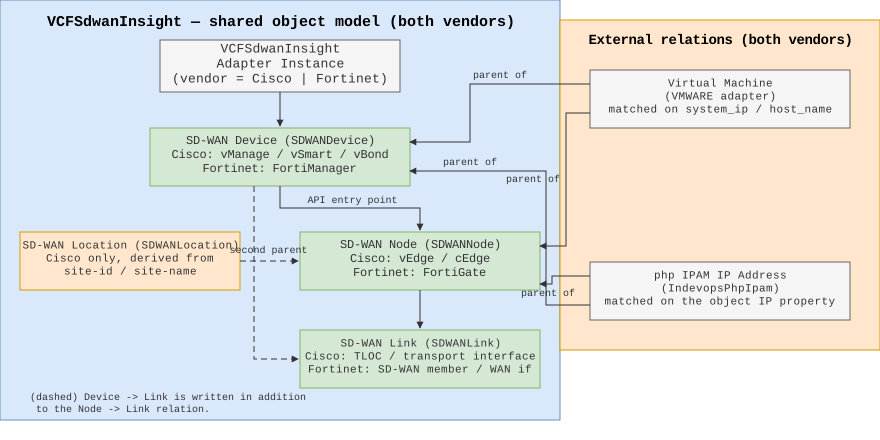
The relationships define how controllers, edge routers, sites and transport links are interconnected. The shape is identical for both vendors, with the site layer present on Cisco only.
VCFSdwanInsight Adapter Instance
 |
 +-- SD-WAN Device                    SDWANDevice
 |     Cisco:    vmanage / vsmart / vbond
 |     Fortinet: FortiManager
 |
 +---- SD-WAN Location                SDWANLocation      (Cisco only, when the inventory carries sites)
 |
 +------ SD-WAN Node                  SDWANNode
 |         Cisco:    vEdge / cEdge edge router
 |         Fortinet: FortiGate
 |
 +-------- SD-WAN Link                SDWANLink
             Cisco:    TLOC / transport interface
             Fortinet: SD-WAN member / WAN interface

Parent/child nesting:
  Adapter Instance -> SD-WAN Device -> SD-WAN Node -> SD-WAN Link
  SD-WAN Location  -> SD-WAN Node   (second parent, next to the device)
  SD-WAN Device    -> SD-WAN Link   (in addition to the node parent)
- The adapter instance is the root and the parent of every SD-WAN Device. For Cisco, the device with
role = vmanageis the SD-WAN Manager the adapter authenticated against; for Fortinet, the single FortiManager is the device. - The device that is the API entry point is the parent of every SD-WAN Node. If the inventory contains no entry-point device, the nodes are attached to the adapter instance and a warning is logged.
- A SD-WAN Location is a second parent of every node of its site on a Cisco deployment that carries sites. The spec requires Device -> Node, so that relation is kept unchanged; an operator simply gains a second way in. A node whose device carries no site keeps only its device parent, and a Fortinet instance creates no Location at all.
- A SD-WAN Link is a child of the node whose
uuidmatches the link'sdevice_uuid, and also a child of the SD-WAN Device of the same adapter instance. Ciscovpn_idis the VPN identifier; Fortinet uses the VDOM (default0). - The link publishes
site_id,site_nameandlocationinherited from its parent device, so a link can be filtered or grouped by site without walking the tree. Thelocationvalue is the identical string the Location object uses as its name.
External relations created by this Management Pack
| Object | Relation | Matching |
|---|---|---|
VMWARE / VirtualMachine | parent of SD-WAN Device and SD-WAN Node | matched on system_ip first, on lower-cased host name second |
The external keys are built with ExternalObjectKey(adapterKind, resourceKind, name, identifiers) and carry ClearPolicyNone, so this Management Pack never prunes relationships it does not own on the vSphere side. Failure of the Aria Operations query set is non-fatal: the collection still succeeds, only the virtual machine relations are skipped.
External relation created by another Management Pack
The VCF IPAM Insight (phpIPAM) Management Pack is expected to relate its IP Address objects to two properties of this Management Pack, so an operator can walk from an address to the device or router that owns it:
| Target | Property | Notes |
|---|---|---|
| SD-WAN Node | management_ip | Top level on purpose. Must not be renamed or moved into a group - the pattern is anchored, so a grouped key would silently stop matching |
| SD-WAN Device | identity|system_ip | The management address of the appliance, labelled Management IP in the UI |
The relation is created and owned by the phpIPAM Management Pack, not by this one: nothing is configured here, and this pack never prunes a relationship it does not own. Whether the relation appears depends on phpIPAM carrying a rule for the VCFSdwanInsight adapter kind and these two resource kinds. The diagram shows the intended topology; a deployment that needs the relation must confirm it is in place on the phpIPAM side.
Collected objects
The four object kinds are:
| Object | Key | Represents |
|---|---|---|
| SD-WAN Location | SDWANLocation | A site: a set of edge routers at one physical location |
| SD-WAN Device | SDWANDevice | The management / control plane appliance |
| SD-WAN Node | SDWANNode | An edge router at a customer site |
| SD-WAN Link | SDWANLink | A transport interface of an edge router - the carrier circuit |
Each object's identifiers, properties, metrics, units and vendor sources are listed in full in the Metrics Reference. Two decisions are worth stating here because they shape the whole model:
There is no tunnel object. An overlay tunnel is not a first class object in this Management Pack. The measurement of every tunnel the link transports is aggregated onto that link - ping, jitter, packet loss as means over the live legs, octets as sums, the SLA-violation count as a counter - and the path counters path_count / path_up_count say how many legs the link has. This keeps the object graph at the size an operator actually navigates (sites, devices, routers, circuits) instead of one object per BFD session. See Tunnel aggregates on the link for the exact aggregation per metric.
Availability is a pair. Every kind declares availability|availability as a 0/1 sample and availability|availability_pct as the 0/100 projection. Aria Operations does not multiply a 0/1 sample by 100 for a percent unit, so the two are separate metrics that live in the same folder. Alerting matches the binary sample; the reports render the percent projection. On the Location the binary sample has a site-level meaning: 1 while at least one reporting edge device of the site is available, because a site is a set of HA pairs and one dead router does not make the site unavailable. The granular question "how degraded is the site" is answered by inventory|node_availability_pct and the nodes_up / nodes_down / nodes_total_reporting split, not by the binary sample.
Administrative and operational status
status|operational_status uses the same Up / Down vocabulary on SD-WAN Link, SD-WAN Node and SD-WAN Device, because the shipped "Link is down" alert matches that exact string. An unknown state emits no property rather than a fabricated value. admin_status stays declared for the vendors that actually report an administrative state; a vendor that does not report one writes no point at all rather than mirroring operational_status.
| Object | operational_status source | admin_status source |
|---|---|---|
SDWANLink | Cisco interface oper-status; Fortinet member link | Cisco interface admin-status; intentionally omitted for Fortinet - the member state is a single up/down signal and is already operational_status |
SDWANNode (Cisco) | /dataservice/device reachability | intentionally omitted - the API exposes no administrative enable/disable state |
SDWANNode (Fortinet) | /dvmdb/device conn_status (numeric enum) | intentionally omitted - /dvmdb/device has no administrative enable/disable field |
SDWANDevice (Cisco) | /dataservice/device reachability | intentionally omitted - same reason as the node |
SDWANDevice (Fortinet) | Up when the FortiManager answered the system status RPC, Down otherwise | intentionally omitted - no administrative state over JSON-RPC |
Alerts
The Management Pack ships 24 alert definitions over 30 symptom definitions and 24 recommendations, all defined in the single content/alertdefs/alertDefinitions.xml: 9 on SDWANDevice, 11 on SDWANNode and 4 on SDWANLink. All alerts are symptom based and the thresholds below are the shipped defaults, which can be adjusted per environment through a VMware Aria Operations policy. They are shared by both vendors: the Fortinet collection path normalises the status vocabulary (reachable, Up / Down, in_sync / out_of_sync) so these conditions evaluate correctly on Fortinet objects.
Alerting is a two stage escalation ladder, so the ladder stays visible in the Aria Operations UI:
- Instant stage - Warning. An object that becomes unreachable or down raises
Controller is unreachable,Node is unreachableorLink is downon the first collection cycle. - Sustained stage - Critical. An object that stays unavailable for its whole SLA budget raises
SD-WAN Node|Link unavailable continuously for 8 hours(SLA level 1) or… for 4 hours(SLA level 2).
The instant stage is deliberately a warning: a critical from the first cycle would already put the object in the critical bucket, and the sustained-outage alert could then no longer change what the operator sees. Only the sustained stage is critical, and it is the one that represents an actual SLA breach.
The delay of the sustained stage lives in the symptom waitCycle, because a waitCycle counts collection cycles, not wall clock time:
| Alert | Availability symptom waitCycle | Wall clock delay at a 5 minute interval |
|---|---|---|
SD-WAN Node unavailable continuously for 8 hours | 96 | 8 h |
SD-WAN Node unavailable continuously for 4 hours | 48 | 4 h |
SD-WAN Link unavailable continuously for 8 hours | 96 | 8 h |
SD-WAN Link unavailable continuously for 4 hours | 48 | 4 h |
The wall clock delay therefore depends on the collection interval of the adapter instance: an instance collecting every minute reaches the 8 h stage after 96 minutes, one collecting every 15 minutes after 24 h. The SLA level itself is resolved per object from sla_default_level / sla_overrides, and the alert additionally requires the matching sla_level property, so a level 1 object only ever raises the 8 h alert and a level 2 object only the 4 h one. The availability condition matches availability|availability == 0, the binary sample the adapter writes every cycle for every discovered object.
SD-WAN Device
| Alert definition | Severity | Trigger |
|---|---|---|
| Controller is unreachable | Warning | Reachability is not reachable (instant stage of the ladder) |
| Controller CPU usage is high | Warning | CPU Usage >= 70 % |
| Controller CPU usage is critically high | Critical | CPU Usage >= 80 % |
| Controller memory usage is high | Warning | Memory Usage >= 70 % |
| Controller memory usage is critically high | Critical | Memory Usage >= 80 % |
| Controller disk usage is high | Warning | Disk Usage >= 70 % |
| Controller disk usage is critically high | Critical | Disk Usage >= 80 % |
| Controller certificate is about to expire | Warning | Certificate Days To Expiry <= 30 |
| Controller certificate expires shortly | Critical | Certificate Days To Expiry <= 7 |
SD-WAN Node
| Alert definition | Severity | Trigger |
|---|---|---|
| Node is unreachable | Warning | Reachability is not reachable (instant stage of the ladder) |
| Node CPU usage is high | Warning | CPU Usage >= 70 % |
| Node CPU usage is critically high | Critical | CPU Usage >= 80 % |
| Node memory usage is high | Warning | Memory Usage >= 70 % |
| Node memory usage is critically high | Critical | Memory Usage >= 80 % |
| Node disk usage is critically high | Critical | Disk Usage >= 80 % |
| Node temperature is high | Warning | Temperature >= 60 degrees Celsius |
| Node temperature is critically high | Critical | Temperature >= 70 degrees Celsius |
| Node certificate is about to expire | Warning | Certificate Days To Expiry <= 30 |
| SD-WAN Node unavailable continuously for 8 hours | Critical | Availability == 0 for 96 cycles (8 h at 5 min) and sla_level == 1 |
| SD-WAN Node unavailable continuously for 4 hours | Critical | Availability == 0 for 48 cycles (4 h at 5 min) and sla_level == 2 |
There is deliberately no Node disk usage is high warning: the disk signal of an edge router is coarse, and a two-stage ladder on it produced warning noise without a critical follow-up. The critical stage at 80 % is kept.
SD-WAN Link
| Alert definition | Severity | Trigger |
|---|---|---|
| Link is down | Warning | Operational Status is not Up and link_role != backup and the link carries at least one path (instant stage of the ladder) |
| SD-WAN Link has no working path | Warning | inventory|path_up_count == 0 and inventory|path_count > 0 and link_role != backup |
| SD-WAN Link unavailable continuously for 8 hours | Critical | Availability == 0 for 96 cycles (8 h at 5 min), sla_level == 1, link_role != backup and inventory|path_count > 0 |
| SD-WAN Link unavailable continuously for 4 hours | Critical | Availability == 0 for 48 cycles (4 h at 5 min), sla_level == 2, link_role != backup and inventory|path_count > 0 |
All three link alerts require a known link_role that is not backup, so a member the SD-WAN policy declares a standby - cost > 0 or priority > 1 - raises neither a warning nor a critical. On Cisco every link is written as primary, so that condition is always satisfied there. All three additionally require inventory\|path_count > 0: a physical interface that transports no overlay path is inventory, not a monitored service, so it raises nothing at all.
SD-WAN Link has no working path covers the case the other three miss: the interface is up (availability = 1, so no down alert) but every overlay path over it is down (path_up_count = 0 while path_count > 0). Before this alert existed that state raised nothing at all.
The three utilization metrics carry no alert definition. The adapter emits a utilization point only when a link capacity resolves (an explicit link_capacity_overrides entry, the link_capacity_default parameter, or an interface speed reported by the API); on a deployment without any of those the metric never exists. An alarm bound to a metric that is legitimately absent could not be trusted, so utilization is reported and rendered in reports and dashboards but never alerted on. The same reasoning removed the flap alert: the flap counter is not referenced by any alert definition.
Every alert definition ships with a recommendation describing the first remediation step, which is shown together with the alert in VMware Aria Operations.
A metric that could not be read from the management platform produces no data point at all rather than a zero, so an alert never fires because of an unavailable API endpoint. This is what keeps the temperature, BFD, certificate and error conditions quiet on platforms that have no such sensor or session, and the Fortinet "not collected" metrics from ever raising an alert.
Events
The Management Pack emits ten informational conditions as events, not as alerts. They describe what a link or a node is doing right now - jitter, loss, error counters, configuration drift, BFD and control-connection counts - and none of them is actionable enough to justify paging somebody. Each was previously an alert definition and is now emitted from the collection cycle that writes the underlying metric. The error condition covers both directions, so the ten conditions produce the eleven distinct event messages in the table below.
| Event message | Object | Condition | Threshold |
|---|---|---|---|
Link jitter <x> ms is above 50 ms (critical) | WAN Link | quality|jitter | >= 50 ms |
Link jitter <x> ms is above 30 ms | WAN Link | quality|jitter | >= 30 ms |
Link packet loss <x> % is above 20 % (critical) | WAN Link | quality|packet_loss | >= 20 % |
Link packet loss <x> % is above 10 % | WAN Link | quality|packet_loss | >= 10 % |
Link has <n> receive errors, above 100000 | WAN Link | errors|rx_errors | > 100 000 |
Link has <n> transmit errors, above 100000 | WAN Link | errors|tx_errors | > 100 000 |
Node configuration is out of sync | SD-WAN Node | status|template_status | == out_of_sync |
Node has <n> BFD sessions down | SD-WAN Node | bfd|bfd_sessions_down | > 0 |
Node has no BFD sessions up | SD-WAN Node | bfd|bfd_sessions_up | == 0 |
Node has no control connections | SD-WAN Node | control_plane|control_connections | == 0 |
Controller has no control connections | SD-WAN Device | control_plane|control_connections | == 0, and only for a non-Cisco device |
The emission rules are deliberately conservative:
- an event is emitted only when the underlying metric is actually present in the current cycle. A missing measurement is not a condition, so an absent quality sample raises nothing;
- the link quality and error events keep the
link_role != backupgate their former alerts carried: a backup link is down (and therefore lossy) by design and must not narrate its normal state; - the message names the metric and the measured value, so an operator reading the event list knows what triggered it without opening the object;
- the controller event is scoped in code to a non-Cisco device, because vManage is itself the controller and has no outgoing control connections by definition. The condition applies to the FortiManager, whose
control_connectionsis the number of connected FortiGates; - only the receive branch of the error event is emitted when both directions exceed the threshold. One event states which side is bad; emitting two would repeat "this link is failing" twice per cycle.
Every event is INFO criticality and auto-cancels after three missing cycles, so an event disappears by itself once the condition stops being true - the adapter never has to send an explicit cancel.
The two jitter thresholds and the two packet-loss thresholds of one metric are evaluated independently: a link at 55 ms of jitter crosses both 50 ms and 30 ms, so both the critical and the elevated event are emitted, preserving the two-stage reading of the former alert ladder.
SLA budget configuration
sla_level1_hours (default 8), sla_level2_hours (default 4) and sla_window_days (default 30) make the availability budget configurable, so another customer with a different monthly budget does not need a rebuild. sla_allowed_downtime_hours is the configured value of the level, and sla_availability_threshold is derived as (1 - hours / (windowDays * 24)) * 100, rounded to two decimals. With the defaults this is exactly 8 / 4 and 98.89 / 99.44, i.e. the shipped behaviour. The reports show the threshold next to the measured availability, and the same budget is what the sustained stage of the alerting ladder waits for: 8 h / 4 h, expressed as 96 / 48 collection cycles.
Changing the two budget values changes what the reports compare against and what sla_level an object carries, but does not re-scale those waitCycles - they are fixed at the 8 h / 4 h default expressed in five minute cycles, so an instance whose collection interval is not five minutes already sees a different wall clock delay (the table above).